
- CTRL+A. . . . . . . . . . . . . . . . . Select All CTRL+C. . . . . . . . . . . . . . . . . Copy
- CTRL+X. . . . . . . . . . . . . . . . . Cut
- CTRL+V. . . . . . . . . . . . . . . . . Paste
- CTRL+Z. . . . . . . . . . . . . . . . . Undo
- CTRL+B. . . . . . . . . . . . . . . . . Bold
- CTRL+U. . . . . . . . . . . . . . . . . Underline
- CTRL+I . . . . . . . . . . . . . . . . . Italic
- F1 . . . . . . . . . . . . . . . . . . . . . . Help
- F2 . . . . . . . . . . . . . . . . . . . . . Rename selected object
- F3 . . . . . . . . . . . . . . . . . . . . . Find all files
- F4 . . . . . . . . . . . . . . . . . . . . . Opens file list drop-down in dialogs
- F5 . . . . . . . . . . . . . . . . . . . . . Refresh current window
- F6 . . . . . . . . . . . . . . . . . . . . . Shifts focus in Windows Explorer
- F10 . . . . . . . . . . . . . . . . . . . . Activates menu bar options
- ALT+TAB . . . . . . . . . . . . . . . . Cycles between open applications
- ALT+F4 . . . . . . . . . . . . . . . . . Quit program, close current window
- ALT+F6 . . . . . . . . . . . . . . . . . Switch between current program windows
- ALT+ENTER. . . . . . . . . . . . . . Opens properties dialog
- ALT+SPACE . . . . . . . . . . . . . . System menu for current window
- ALT+¢ . . . . . . . . . . . . . . . . . . opens drop-down lists in dialog boxes
- BACKSPACE . . . . . . . . . . . . . Switch to parent folder
- CTRL+ESC . . . . . . . . . . . . . . Opens Start menu
- CTRL+ALT+DEL . . . . . . . . . . Opens task manager, reboots the computer
- CTRL+TAB . . . . . . . . . . . . . . Move through property tabs
- CTRL+SHIFT+DRAG . . . . . . . Create shortcut (also right-click, drag)
- CTRL+DRAG . . . . . . . . . . . . . Copy File
- ESC . . . . . . . . . . . . . . . . . . . Cancel last function
- SHIFT . . . . . . . . . . . . . . . . . . Press/hold SHIFT, insert CD-ROM to bypass auto-play
- SHIFT+DRAG . . . . . . . . . . . . Move file
- SHIFT+F10. . . . . . . . . . . . . . . Opens context menu (same as right-click)
- SHIFT+DELETE . . . . . . . . . . . Full wipe delete (bypasses Recycle Bin)
- ALT+underlined letter . . . . Opens the corresponding menu
- PC Keyboard Shortcuts
- Document Cursor Controls
- HOME . . . . . . . . . . . . . . to beginning of line or far left of field or screen
- END . . . . . . . . . . . . . . . . to end of line, or far right of field or screen
- CTRL+HOME . . . . . . . . to the top
- CTRL+END . . . . . . . . . . to the bottom
- PAGE UP . . . . . . . . . . . . moves document or dialog box up one page
- PAGE DOWN . . . . . . . . moves document or dialog down one page
- ARROW KEYS . . . . . . . move focus in documents, dialogs, etc.
- CTRL+ > . . . . . . . . . . . . next word
- CTRL+SHIFT+ > . . . . . . selects word
- Windows Explorer Tree Control
- Numeric Keypad * . . . Expand all under current selection
- Numeric Keypad + . . . Expands current selection
- Numeric Keypad – . . . Collapses current selection
- ¦ . . . . . . . . . . . . . . . . . . . Expand current selection or go to first child
- ‰ . . . . . . . . . . . . . . . . . . Collapse current selection or go to parent
- Special Characters
- ‘ Opening single quote . . . alt 0145
- ’ Closing single quote . . . . alt 0146
- “ Opening double quote . . . alt 0147
- “ Closing double quote. . . . alt 0148
- En dash. . . . . . . . . . . . . . . alt 0150
- Em dash . . . . . . . . . . . . . . alt 0151
- En dash. . . . . . . . . . . . . . . alt 0150
- … Ellipsis. . . . . . . . . . . . . . . . alt 0133
- Bullet . . . . . . . . . . . . . . . . alt 0149
- Registration Mark . . . . . . . alt 0174
- Copyright . . . . . . . . . . . . . alt 0169
- Trademark . . . . . . . . . . . . alt 0153
- ° Degree symbol. . . . . . . . . alt 0176
- ¢ Cent sign . . . . . . . . . . . . . alt 0162
- 1⁄4 . . . . . . . . . . . . . . . . . . . . . alt 0188
- 1⁄2 . . . . . . . . . . . . . . . . . . . . . alt 0189
- 3⁄4 . . . . . . . . . . . . . . . . . . . . . alt 0190
- PC Keyboard Shortcuts
- Creating unique images in a uniform world! Creating unique images in a uniform world!
- é . . . . . . . . . . . . . . . alt 0233
- É . . . . . . . . . . . . . . . alt 0201
- ñ . . . . . . . . . . . . . . . alt 0241
- ÷ . . . . . . . . . . . . . . . alt 0247
- File menu options in current program
- Alt + E Edit options in current program
- F1 Universal help (for all programs)
- Ctrl + A Select all text
- Ctrl + X Cut selected item
- Shift + Del Cut selected item
- Ctrl + C Copy selected item
- Ctrl + Ins Copy selected item
- Ctrl + V Paste
- Shift + Ins Paste
- Home Go to beginning of current line
- Ctrl + Home Go to beginning of document
- End Go to end of current line
- Ctrl + End Go to end of document
- Shift + Home Highlight from current position to beginning of line
- Shift + End Highlight from current position to end of line
- Ctrl + f Move one word to the left at a time
- Ctrl + g Move one word to the right at a time
- MICROSOFT WINDOWS® SHORTCUT KEYS
- Alt + Tab Switch between open applications
- Alt +
- Shift + Tab
- Switch backwards between open
- applications
- Alt + Print
- Screen
- Create screen shot for current program
- Ctrl + Alt + Del Reboot/Windows task manager
- Ctrl + Esc Bring up start menu
- Alt + Esc Switch between applications on taskbar
- F2 Rename selected icon
- F3 Start find from desktop
- F4 Open the drive selection when browsing
- F5 Refresh contents
- Alt + F4 Close current open program
- Ctrl + F4 Close window in program
- Ctrl + Plus
- Key
- Automatically adjust widths of all columns
- in Windows Explorer
- Alt + Enter Open properties window of selected icon
- or program
- Shift + F10 Simulate right-click on selected item
- Shift + Del Delete programs/files permanently
- Holding Shift
- During Bootup
- Boot safe mode or bypass system files
- Holding Shift
- During Bootup
- When putting in an audio CD, will prevent
- CD Player from playing
- WINKEY SHORTCUTS
- WINKEY + D Bring desktop to the top of other windows
- WINKEY + M Minimize all windows
- WINKEY +
- SHIFT + M
- Undo the minimize done by WINKEY + M
- and WINKEY + D
- WINKEY + E Open Microsoft Explorer
- WINKEY + Tab Cycle through open programs on taskbar
- WINKEY + F Display the Windows Search/Find feature
- WINKEY +
- CTRL + F
- Display the search for computers window
- WINKEY + F1 Display the Microsoft Windows help
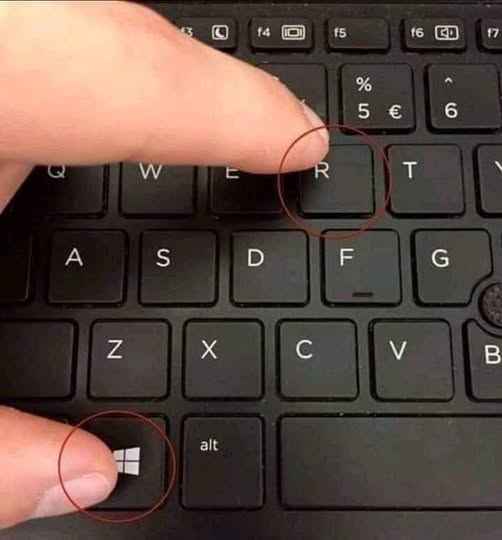
- WINKEY + R Open the run window
- WINKEY +
- Pause /Break
- Open the system properties window
- WINKEY + U Open utility manager
- WINKEY + L Lock the computer (Windows XP & later)
- OUTLOOK SHORTCUT KEYS
- Alt + S Send the email
- Ctrl + C Copy selected text
- Ctrl + X Cut selected text
- Ctrl + P Open print dialog box
- Ctrl + K Complete name/email typed in address bar
- Ctrl + B Bold highlighted selection
- Ctrl + I Italicize highlighted selection
- Ctrl + U Underline highlighted selection
- Ctrl + R Reply to an email
- Ctrl + F Forward an email
- Ctrl + N Create a new email
- Ctrl + Shift + A Create a new appointment to your calendar
- Ctrl + Shift + O Open the outbox
- Ctrl + Shift + I Open the inbox
- Ctrl + Shift + K Add a new task
- Ctrl + Shift + C Create a new contact
- Ctrl + Shift+ J Create a new journal entry
- WORD SHORTCUT KEYS
- Ctrl + A Select all contents of the page
- Ctrl + B Bold highlighted selection
- Ctrl + C Copy selected text
- Ctrl + X Cut selected text
- Ctrl + N Open new/blank document
- Ctrl + O Open options
- Ctrl + P Open the print window
- Ctrl + F Open find box
- Ctrl + I Italicize highlighted selection
- Ctrl + K Insert link
- Ctrl + U Underline highlighted selection
- Ctrl + V Paste
- Ctrl + Y Redo the last action performed
- Ctrl + Z Undo last action
- Ctrl + G Find and replace options
- Ctrl + H Find and replace options
- Ctrl + J Justify paragraph alignment
- Ctrl + L Align selected text or line to the left
- Ctrl + Q Align selected paragraph to the left
- Ctrl + E Align selected
__________The End__________